


Jump It, Charge It, Clean It, Change It: Your Guide to Car Battery Care
October 29, 2020
Jump it, charge it, clean it, change it! Sounds like a lot of work, doesn't it? In reality, taking care of your Nissan battery is pretty straightforward once you know how to do it. Plus, doing so can help it last longer and perform better! Learn about the different types of batteries and the ins and outs of battery care.
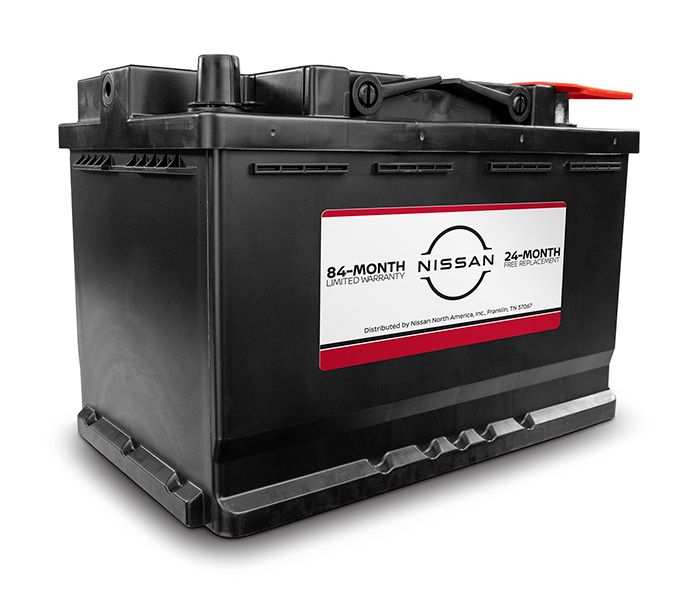
What Types of Batteries Does Nissan Offer?
Before we jump into battery maintenance, lets go over the three types of Nissan batteries.
- Standard flooded battery. This is the most common type of battery. It fits most standard vehicle models.
- Enhanced flooded battery. This is an advanced version of the standard flooded battery, offering more power and supporting start-stop technology.
- Absorbed glass mat battery. This battery, which supports stop-start technology, holds electrolyte in glass mat separators as opposed to freely flooding plates. Its the highest-performing, highest-durability battery among the three types of batteries.
How to Jump-Start Your Nissan Battery
There's a right way and wrong way to jump-start a Nissan battery. One easy way is to contact a roadside assistance service to help get your battery charged and your vehicle running. If you go the DIY route, heres how to do it.
With your jumper cables ready to go and another car around to supply power, follow these steps:
- Position the second car with its front end near enough for the jumper cables to reach the batteries on both vehicles.
- Put both vehicles in park, and ensure the engines are off.
- With jumper cables in hand, attach one of the red clips to the positive (+) terminal on your battery.
- Attach the second red clip to the positive (+) terminal on the other cars battery.
- Attach a black clip to the negative (-) terminal on the other car.
- Attach the second black clip to a metal surface on your car. Make sure the metal is unpainted and not next to the battery. This is called the "ground."
- Double check that the jumper cables are in the right spots and that you placed them in the correct order.
- Turn on the other car and let it run for a few minutes to charge your battery.
- Start your car.
Once your engine starts, drive around for at least 15 minutes to fully charge your battery before shutting your car off. If the battery doesn't start after attempting to jump it, or if it wont start again the next time you try to drive, the battery might need to be replaced.
Keep these tips in mind when you're jump-starting your Nissan:
- Read the owners manual for each vehicle to ensure you're following proper guidelines for jump-starting.
- Check to see whether each battery is the same voltage. If they're not, you should not proceed with a jump-start.
- Do not allow the two vehicles to touch.
- Due to the risk of shock or explosion, don't smoke near a battery or wear jewelry while you're jump-starting a car.
- To avoid a potential expansion, don't jump-start a weak or dead battery if its frozen.
How to Charge Your Nissan Battery
If you own a Nissan LEAF, you wont need to jump-start the battery but you will need to charge it. Heres how to do it in four steps:
- Park the car, and make sure the engine isn't running.
- Open the charge port lid and cap.
- Plug the charge connector into the charge port. When this is done correctly, the Nissan LEAF will alert you with a quick beep.
- When the battery reaches full, the Nissan LEAF stops charging on its own. To end charging at any point, unplug the charge connector.
How to Clean Your Nissan Battery
Ensuring your Nissan battery stays clean is a great way to make it last longer and prevent damage in cold weather. Follow these 14 steps to keep your battery free of corrosion and dirt.
- Find the battery. Its usually under the hood of the vehicle, on the right or left side.
- Assemble your tools and supplies. You'll need disposable gloves, safety goggles, and a work apron. In addition, you'll need a battery terminal cleaner, a spray bottle filled with water, petroleum jelly, a wire brush, metal pliers, and a clean, soft cloth.
- Make sure the engine isn't running. Wait at least 30 minutes after the car was last running to tinker with the battery.
- Put on your safety gear.
- Raise the hood, and check the battery terminals. Look for white, powdery stuff around them. That's corrosion.
- Disconnect the battery by removing the rubber or plastic covers that connect the cables to the battery.
- Find the negative terminal. It will be marked with a minus symbol or have a black terminal cover). With the pliers, loosen the clamp. Do the same with the positive terminal, marked with a plus symbol or a red cover.
- Spray the terminals and clamps. Follow the directions on the bottle of battery terminal cleaner for the right amount of cleaning solution.
- Scrub the terminals and clamps with the wire brush until bare metal is visible.
- Spray the cleaned terminals and clamps with water to get rid of the remaining cleaner or corrosion.
- Dry the terminals and clamps with a clean, soft cloth.
- Apply battery terminal grease to each terminal to help prevent corrosion.
- Reattach the positive clamp to the positive terminal. Make sure you do that first.
- Reattach the negative terminal clamp.
- Replace the terminal covers and close the hood.
If there's corrosion on the battery terminals, try removing it with a 50/50 solution of baking soda and water applied with a small, stiff brush, and then thoroughly rinsing the posts, terminals, and hardware with clean water.
How to Change Your Nissan Battery
The typical vehicle battery lasts about three to five years. If you want to change your Nissan battery on your own, heres how to do it.
- Park your vehicle on level ground.
- Make sure the vehicle engine is turned off.
- Open the hood.
- With a wrench, loosen the negative battery terminal (black cover) enough to be able to pull up the clamp.
- Loosen and disconnect the positive terminal (red cover).
- Loosen the nut on the battery clamp.
- Remove the battery bracket.
- Use a wire brush to scrub off corrosion and oxidation.
- Grip the battery on each side, and lift it up and out.
- Put in the new battery.
- Reinstall the battery bracket.
- Reconnect the positive battery terminal first, then reconnect the negative battery terminal.
- Apply terminal protector to fight corrosion.
- Close the hood.
Here are a few tips to keep in mind when changing a battery:
- When you're choosing what kind of gloves to wear, consider rubber gloves.
- Be extra careful about connecting the right cable to the right terminal.
- When you're removing the old battery, look out for leakage or damage.
Are you looking to replace your old battery? Make sure you get the right one for your Nissan! Nissan genuine batteries are designed to meet your vehicles original specifications and come with an 84-month Limited Warranty.* Order yours today and review your owners manual for specific installation instructions.